Publora
Publora: The Revolutionary Social Media Publishing API for the AI Agent Era
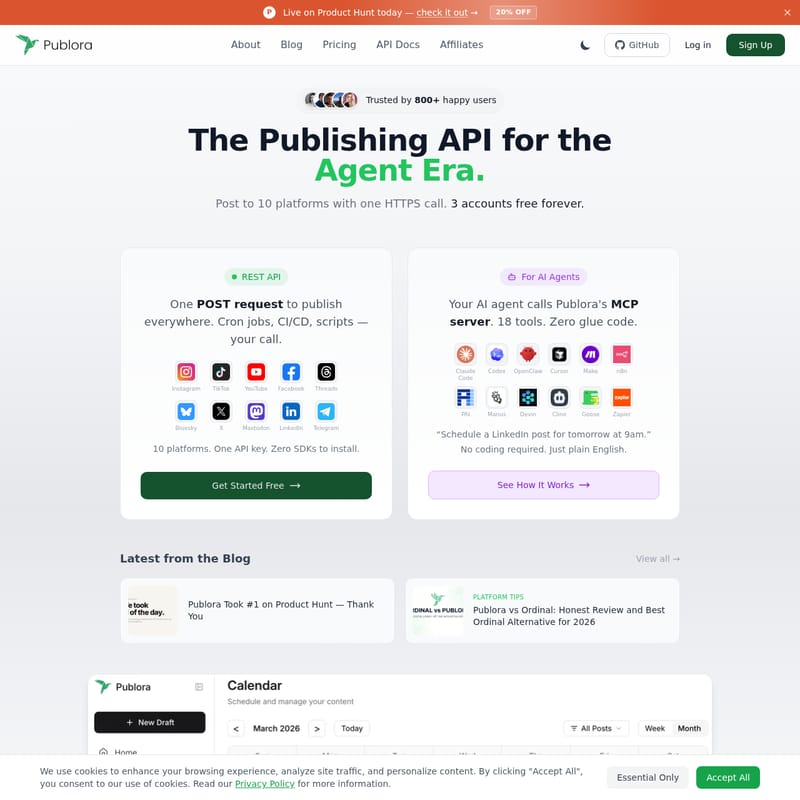
Publora is a cutting-edge social media management platform and publishing API that allows users to post to 10 platforms with a single HTTPS call. Designed for the AI agent era, it features Model Context Protocol (MCP) support, a REST API, and AI-powered content generation tools. Trusted by over 800 users, Publora helps individuals, agencies, and developers schedule posts, track analytics, and manage multiple accounts for platforms like Instagram, X, and LinkedIn. By integrating with AI assistants like Claude and Cursor, Publora reduces management time by 80%, offering a seamless way to maintain consistency and boost engagement across the digital landscape.
2026-06-12
--K
Publora Product Information
Publora: The Revolutionary Social Media Publishing API for the AI Agent Era
In the rapidly evolving world of digital marketing, maintaining a consistent presence across multiple platforms is often a time-consuming and complex task. Publora emerges as the premier solution for this challenge, offering a sophisticated social media management platform designed specifically for the "Agent Era." Whether you are an individual creator, a growing agency, or a developer building the next generation of AI tools, Publora provides the infrastructure needed to streamline your social media strategy.
Publora is trusted by over 800 happy users and is built to help you post to 10 major platforms with just one HTTPS call. By utilizing Publora, you can save more than 10 hours weekly, reducing your social media management time by an impressive 80%. This efficiency allows you to focus on what matters most: creating great content and engaging with your audience.
What’s Publora?
Publora is a comprehensive social media publishing API and management tool that simplifies the process of distributing content across the web. It is marketed as the publishing API for the Agent Era, meaning it is built to work seamlessly with AI agents and automation workflows. With Publora, you can connect to 10 different platforms—including Instagram, TikTok, YouTube, Facebook, Threads, Bluesky, X (Twitter), Mastodon, LinkedIn, and Telegram—all through a single API key.
Unlike traditional scheduling tools that focus solely on the timing of posts, Publora emphasizes what to post and how to maintain consistency. It provides a minimalist, distraction-free space for creators to think clearly and execute their content strategy without friction. From its powerful REST API to its innovative MCP server for AI assistants, Publora is the ultimate bridge between your content and your global audience.
Key Features of Publora
Publora is packed with powerful features designed to give you a competitive edge in the social media landscape. These features are categorized to serve individuals, agencies, and developers alike.
For Individuals and Creators
- Calendar Scheduler: Visualize your entire strategy with an intuitive content calendar. This tool allows for perfect timing across all platforms, ensuring your brand stays top-of-mind.
- Mind-Blowing Editor: Create high-quality content using a robust editor that supports various formats, including text, images, videos, carousels, stories, and reels.
- AI Integration: Leverage an AI Editor and AI Idea Generator that learns from your previous performance to suggest personalized content and fresh ideas.
- Smart Validations: Avoid embarrassing mistakes with automated validations that catch platform-specific issues before you hit publish.
- Email Notifications: Stay updated with real-time status reports regarding your post publishing, account updates, and any potential errors.
For Agencies
- Dedicated Workspaces: Manage multiple clients with ease by keeping accounts, analytics, and content separated in dedicated workspaces.
- Client Management: Simplify your workflow with centralized billing, permission controls, and easy onboarding for new clients.
For Developers
- REST API: Integrate Publora into your own software or no-code platforms like n8n or Zapier. One POST request is all it takes to publish everywhere.
- MCP Server: Use the Model Context Protocol to connect Publora to AI assistants like Claude Code, Cursor, and PAI. This allows your AI agents to manage your social media presence using plain English commands.
How to Use Publora
Getting started with Publora is designed to be a quick and efficient process. You can set up your automated social media workflow in just a few simple steps.
Step 1: Connect Your Platforms
Centralize your social media presence by connecting your accounts to the Publora dashboard.
- Use one-click connections for up to 10 social networks.
- Support for multiple accounts per platform allows for diverse brand management.
- This step eliminates the need to log into multiple sites separately.
Step 2: Craft Your Perfect Post
Use the Publora editor to create content that resonates with your followers.
- Utilize the AI Editor to refine your text and optimize it for specific platforms.
- Ensure your media meets the requirements for reels, stories, or standard posts.
Step 3: Schedule Strategically
Once your content is ready, fill your calendar with a few clicks.
- Manage drafts and use the validation tool to ensure everything is perfect.
- Use the scheduler to plan content up to 2 months in advance.
- Repurpose old content or use the AI to recycle high-performing posts.
Developer Setup (MCP Integration)
For developers using AI assistants, setting up the Publora MCP server takes only two minutes. Add the following configuration to your AI client:
{ "mcpServers": { "publora": { "type": "http", "url": "https://mcp.publora.com", "headers": { "Authorization": "Bearer sk_YOUR_API_KEY" } } } }
Use Cases: Who Should Use Publora?
Publora is a versatile tool that adapts to various professional needs. Here are a few ways different users are utilizing the platform:
- AI Developers: Developers use Publora to give their AI agents (like Devin or Goose) the ability to publish updates directly to social media, creating autonomous loops for software updates or community engagement.
- Social Media Agencies: Agencies manage dozens of client accounts across X, LinkedIn, and Instagram, using dedicated workspaces to ensure content never gets mixed up.
- Content Creators: Individuals use the AI Idea Generator to overcome creative blocks and the Calendar Scheduler to ensure they post consistently, which is key to algorithm growth.
- Small Business Owners: Using plain English through the MCP integration, business owners can tell an AI assistant to "Schedule a LinkedIn post for tomorrow at 9am" without needing to learn complex software.
Pricing Plans
Publora offers flexible pricing to suit users at every stage of their growth. All paid plans are billed yearly to provide the best value.
- Starter (FREE): Perfect for beginners. Includes 15 posts per month, connection for 3 social accounts, support for all platforms except X, and access to the AI Editor.
- Pro ($2.99/mo per account): The most popular choice. Includes 100 posts per account/month, support for all platforms (including X), 100MB video uploads, and 2-month advance scheduling.
- Premium ($5.99/mo per account): For power users. Includes 500 posts per account/month, 250MB video uploads, priority support, and the ability to make custom feature requests.
FAQ
What makes Publora different from other schedulers? Most tools focus strictly on the "when" of posting. Publora focuses on the "what" and the "how." It provides a clean, minimalist space that helps you stay focused and consistent, backed by powerful AI and API tools that traditional schedulers lack.
What platforms does Publora support? Publora currently supports 10 major platforms: Instagram, TikTok, YouTube, Facebook, Threads, Bluesky, X (Twitter), Mastodon, LinkedIn, and Telegram. Support for new platforms is added regularly.
Is there a limit to how many posts I can schedule? There is no limit to the number of posts you can schedule within your plan's monthly allowance. The platform is built to handle high-volume content needs across multiple networks.
Can I manage multiple accounts? Yes. You can manage multiple accounts across various platforms from a single, centralized dashboard, making it easy to maintain consistent branding.
How far in advance can I schedule posts? Standard scheduling allows you to plan your content up to 2 months in advance. For longer lead times, users are encouraged to contact support.