Superset Mobile
Superset Mobile is an iPhone companion app that lets developers launch terminal coding agents, monitor execution, supply text or voice inputs, and review code diffs across connected machines and cloud workspaces.
What the product does and how it is positioned
Superset Mobile serves as an iPhone companion to the Superset development environment. The application enables engineers to stay connected to active coding agent sessions, track terminal progress, and manage tasks remotely without remaining at a computer.
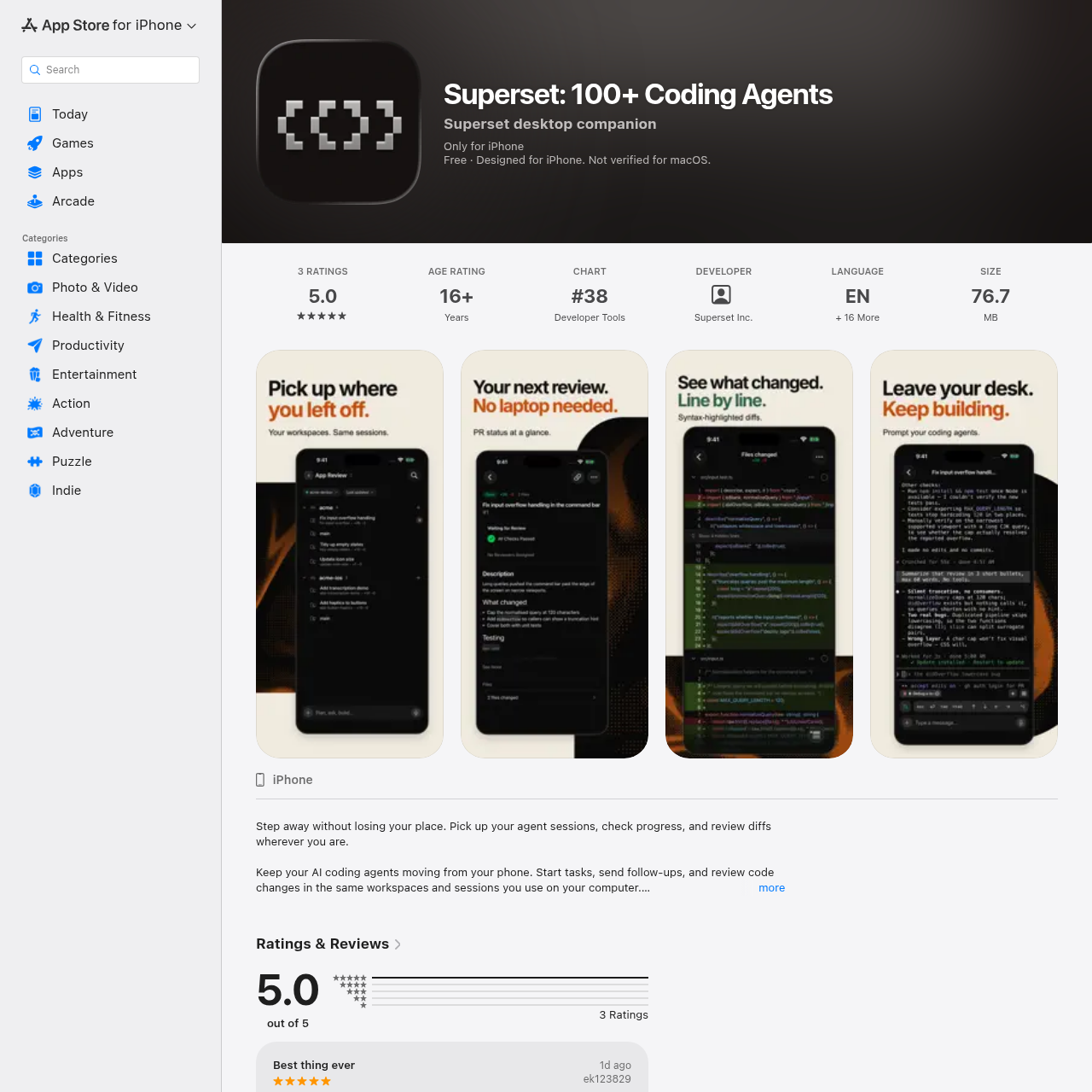
Code execution and agent tasks run on connected desktop computers or in Superset cloud workspaces rather than on the phone itself. Through the mobile interface, users can inspect live terminal output, submit inputs such as photos or voice dictations, and review syntax-highlighted code diffs.
Source-supported ways to use the product
Developers can monitor the live terminal output and progress of long-running coding agents while away from their workstation.
Engineers can inspect file-by-file syntax-highlighted diffs and review GitHub pull request statuses directly on an iPhone.
Users can guide active agent sessions by submitting follow-up text prompts, photo attachments, or dictated voice instructions.
The documented workflow, where available
Sign in with the same Superset account used on a computer to link connected machines, cloud workspaces, and existing agent sessions.
Choose a workspace on a connected machine or cloud environment, select the agent model, and configure the desired effort level.
Follow live terminal outputs and provide follow-up commands, photos, file attachments, or dictated audio instructions.
Examine syntax-highlighted diffs in monospace font and open pull request links generated during terminal sessions.
Superset Mobile acts as a portable management layer for terminal-based coding agents executing across connected desktop machines or Superset cloud workspaces. The interface provides access to sessions powered by tools such as Claude Code, Codex, Gemini CLI, Cursor Agent, and Copilot.
When initiating a task, developers can configure the underlying model and specify the reasoning effort, with settings preserved per agent. In addition to monitoring live terminal outputs, users can inspect file-by-file code diffs rendered in monospace font and access GitHub pull requests directly through terminal links.
Checks to run with your own material and workflow
What was checked and when
Answers based on the source-checked product record
No. Coding agents and code execution run on a connected computer or in a Superset cloud workspace, while the iPhone is used to follow progress and provide input.
Users can send follow-up instructions via typed text, photos, uploaded file attachments, or dictated voice messages.
The platform works with terminal agents including Claude Code, Codex, Gemini CLI, Cursor Agent, Copilot, OpenCode, and Amp.
The mobile app is designed for iPhone and requires iOS 26.0 or later. It is not verified for macOS.
Developers can examine file-by-file syntax-highlighted diffs in monospace font and tap GitHub pull request links directly from the terminal interface.